
If your lab's data lives across paper notebooks, a shared drive, and large messy spreadsheets, an electronic lab notebook (ELN) is probably on your radar. Before you look at any vendor, it helps to understand what you are actually buying. That way you will not expect the software to do things it was never built to do.
This article explains a distinction that rarely comes up before you buy. Every ELN lets you enter data the same way. What happens to that data after you hit save is different, and that difference is invisible on screen. It decides what the tool can do for you later.
Once you can tell how a notebook stores data, the next step is deciding which notebook fits your lab. That is the 5-bucket selection framework: The Complete 5-Bucket Guide to Choosing an Electronic Lab Notebook (ELN).
Three ways a lab notebook can store your data
Underneath the screen, every ELN stores data in one of three ways. It helps to name them clearly before looking at an example.
Digital binder. Your entry is saved as one document, similar to a Word file. Fields exist for basic details like the date or project name, but nothing enforces what goes into them. The body of the entry, including any tables you build, is saved as formatted text. The system does not understand it as data.
Governed canvas. Your entry still has a procedure section you can write freely. But the parts of the entry meant to hold results, like a table of measurements, follow a fixed template. Field names are set once, and the system checks what type of value belongs in each one.
Compliance engine. The same idea as a governed canvas, enforced one level deeper, inside an actual database. Every field is a database column, and the database itself enforces the rules for that column. Every change to a value is recorded automatically.
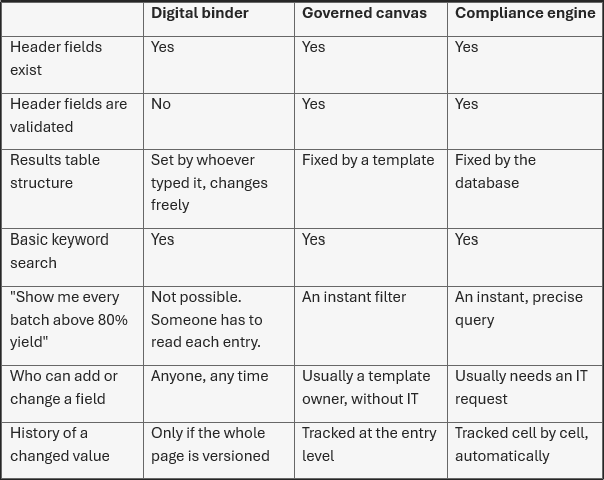
Compliance engine here describes a storage pattern, not a specific product category. Audit trails and electronic signatures can appear in an ELN without the full rigid workflow of a LIMS. A LIMS can also include looser, narrative sections. What matters for this article is the storage pattern underneath, which cuts across both kinds of product.
Almost no real vendor is a pure example of just one of these three. We'll come back to that later. For now, keep the three definitions in mind. Everything below refers back to them.
An example experiment
Say a scientist runs a reaction across three trial batches. They open a new entry and fill in six things: Experiment ID, Date, Author, Project, Procedure, and Results table, and attach a measurement file.
*** EXP-014 ***
Experiment ID: EXP-014
Date: 3 Aug 2026
Author: B. Long
Project: Catalyst screening
Procedure: Ran the standard reduction reaction across three
trial batches under identical starting conditions. B2 ran
a little hot halfway through, temperature drifted to roughly
45°C for about ten minutes before being brought back under
control.
Results table:
Batch | Yield (%)
B1    | 76
B2    | 82
B3    | 79
Attachment: measurement_results.pdf
*** EXP-014 ***
The scientist would build this exact entry, in exactly this way, on any of the three systems. The header fields look the same. The procedure box looks the same. The table looks the same. A demo cannot show you the difference, because there is no visible difference. Everything below happens after the scientist hits save.
How each system stores the header
The header holds the experiment ID, date, author, and project. All three systems keep these in separate fields, apart from the main text of the entry. That much is shared.
Digital binder. The date field accepts whatever text you type: "3 Aug 2026," "08/03/2026," or just "Aug 3." Nothing checks the format. The project field is a plain text box. One entry might say "Catalyst screening." Another might say "catalyst Screening." A third might say "Cat. Screening." All three are accepted. To the system, these are three different projects, even though a person would recognise them as the same one.
Governed canvas. The date field only accepts a real date and rejects anything formatted incorrectly. The project field is usually a dropdown, built from a maintained list of active projects. Whichever project you pick, it is stored exactly the same way every time.
Compliance engine. The date is stored as a proper date column, and the database itself rejects invalid entries. The project is usually stored as a reference to a single row in a separate projects table. "Catalyst screening" cannot exist under two different spellings, because there is only one row for anything to point to.
The header fields exist in all three systems. What differs is whether the system checks what you put in them.
How each system stores the results table
Now the part that is actually being measured: the results table.
Digital binder
<table>
  <tr><td>Batch</td>
      <td>Yield %</td></tr>
  <tr><td>B1</td><td>76</td></tr>
  <tr><td>B2</td><td>82</td></tr>
  <tr><td>B3</td><td>79</td></tr>
</table>
The table is saved as formatted markup, similar to how a Word document saves a table, sitting inside the same document as the rest of the entry. It looks correct when you open it again. But nothing enforces what the table has to contain. Next month's entry could label the same column "Yield (%)" instead of "Yield %." A cell could hold "82," "~82," or "TBD," and the system would accept all three equally, because it never checked at the time when it was saved.
Governed canvas
"results": [
  { "batch": "B1", "yield_pct": 76 },
  { "batch": "B2", "yield_pct": 82 },
  { "batch": "B3", "yield_pct": 79 }
]
The table is built from a template with fixed column names and fixed value types. "Batch" is text. "Yield %" is a number. Every entry made from this template has to match. You cannot rename the column by accident, and you cannot type a letter into a number field. While these admin-defined columns cannot be altered, super-users typically have freedom to add new ones, e.g., a comment column.
Compliance engine
RESULTS
exp_id  | batch | yield_pct
EXP-014 | B1    | 76
EXP-014 | B2    | 82
EXP-014 | B3    | 79

AUDIT_LOG
exp_id  | batch | field     | old_value | new_value | changed_by / when
EXP-014 | B2    | yield_pct | 78        | 82        | J. Lee, 2026-08-06
The same idea, but the columns are enforced by the backend database itself, not just by the template. Changing the structure, like adding a new column, usually requires an IT request, because it means altering a live production database. In exchange, every change to a value is tracked automatically. If someone corrects batch B2's yield from 78% to 82% three days later, the system keeps both numbers, along with who made the change and when.
Why this matters later
Here is what these storage differences mean once you try to use the data.
A note on the digital binder row. A digital binder was never designed to answer structured questions like "show me every batch with yield above 80%." What looks like a table on screen is formatting. It was never a promise that the same column will hold the same kind of value from one entry to the next. Turning years of these kind of documents into something a database can query usually means someone manually extracting and copying the data, or building custom scripts to guess a structure that was never actually there. This is something you want to avoid if you are building up a data repository.
But this disadvantage is also exactly why digital binder systems exist at all. They have a different advantage: freedom. Imagine the same scientist is asked to record something completely different, like data on a reactor clean-up procedure, and the ELN only offers this batch-yield template. The template would not fit, and the scientist would not be able to use the notebook at all. Exploratory work often needs a digital binder precisely because it does not force every entry into the same shape.
No vendor is a pure example
In practice, almost no ELN is purely one of these three models. Every ELN, whichever model it leans toward, stores attachments like instrument files, images, and chromatograms as plain files rather than forcing them into structured fields. That is the sensible way to handle a raw file.
Many governed-canvas systems also run a real relational database underneath, for things like inventory or user permissions. Some compliance-grade systems add a free-text module for narrative work. Many modern platforms are deliberately mixed: the same system can offer a free-text section next to a structured one, with the amount of structure set per project or per template.
Use the three models as a guide to a vendor's general direction, not as three boxes to sort every vendor into.
A separate field is not a trustworthy field
There is one more layer worth knowing about, and we touched upon that briefly earlier. It applies on top of everything above, regardless of which model you pick.
A field being structured, or even validated for type, does not guarantee two people entered the same thing. Take a "solvent" field. It could be a properly typed, filterable field in a governed canvas or compliance engine, and still cause problems: one scientist types "ethanol," another types "EtOH," a third types "ethyl alcohol." All three are accepted values. None of them are recognised by the system as the same thing.
This shows up in two places. In the header metadata, inconsistent project names or batch categories fragment your ability to group work later. In the results themselves, inconsistent units or reagent names break any attempt to combine or model the data, even when every field is technically structured.
Fixing this needs something beyond architecture. It needs a controlled vocabulary, which is a fixed list of allowed values. It needs an ontology, which is a set of rules connecting related terms, so the system knows "ethanol" and "EtOH" mean the same thing. And it needs validation rules, like requiring a consistent unit. None of this comes automatically just by choosing a governed canvas or a compliance engine over a digital binder. Ask about it directly, as a separate question from "is this field structured."
Where the market is heading
This shift toward structured data began years before AI became part of the sales pitch. Here are two examples. PerkinElmer, now Revvity, launched Signals Notebook in 2017, moving deliberately toward structured recording of experiments instead of free-form notes, specifically to make results easier to find and reuse later. That is the governed-canvas model, built roughly a decade before "AI-ready" became a common phrase.
More recently, Dotmatics has positioned its newest platform update around structured, schema-backed data captured at the point of work. The company frames this as what makes AI-assisted analysis and regulatory traceability possible, instead of trying to reconstruct structure from free text after the fact.
Two vendors, a decade apart, arriving at a similar conclusion is a reasonable signal about where the market is going. AI tools used for search, summarisation, and analysis work far better against structured data than against prose. That is quietly pushing more of the market toward the governed-canvas end of the spectrum, even for vendors whose roots are in free text.
The one question worth asking in every demo
Ask this directly: "When I type a number into this field, does the system understand it as a number, or is it just text I can search for later?"
Every system lets you search. The difference is whether a search finds a page that mentions a number, or precisely filters and sorts on that number as a value. This difference is invisible until you ask about it directly, or until you need the answer six months from now and find out which one you actually have.
That very important question tells you about structure. But it will still not tell you about consistency, the "EtOH" versus "ethanol" problem from earlier, so keep that as a second, separate check once you are past the structure question.